使用HSPICE进行仿真时,偶尔会遇到lmgrd did not run on license SERVER的错误提示,系统将显示Cannot connect to license server The server(lmgrd) has not been started。这通常意味着许可证管理服务未正常启动,导致软件无法连接到授权服务器,进而无法获取运行所需的许可证。解决该问题需检查许可服务器配置、确保相关服务进程已正确运行,并确认网络连接与授权文件设置无误。
1、 找到名为lmtools.exe的程序并运行它。

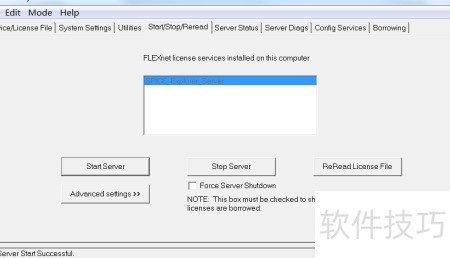
2、 进入Start/Stop/Read页面,点击启动服务器按钮即可开始服务。
https://soft.zol.com.cn/1210/12101060.html
soft.zol.com.cn
true
中关村在线
https://soft.zol.com.cn/1210/12101060.html
report
459
使用HSPICE进行仿真时,偶尔会遇到lmgrd did not run on license SERVER的错误提示,系统将显示Cannot connect to license server The server(lmgrd) has not been started。这通常意味着许可证管理服务未正常启动,导致软件无法连接到授权服务器,进而无法获取运行所需...


